
I've written about this setup twice: Building my Terminal Setup covered the shell, fonts, and Ghostty, and A tmux Workspace Built Around the Claude Code Autopilot covered the project launcher, worktrees, and per-project tmux servers. Since then the right side of every workspace grew a three-pane column, the editor changed to neovim, and a shared notepad appeared. This is what a working session looks like now.
What's on screen
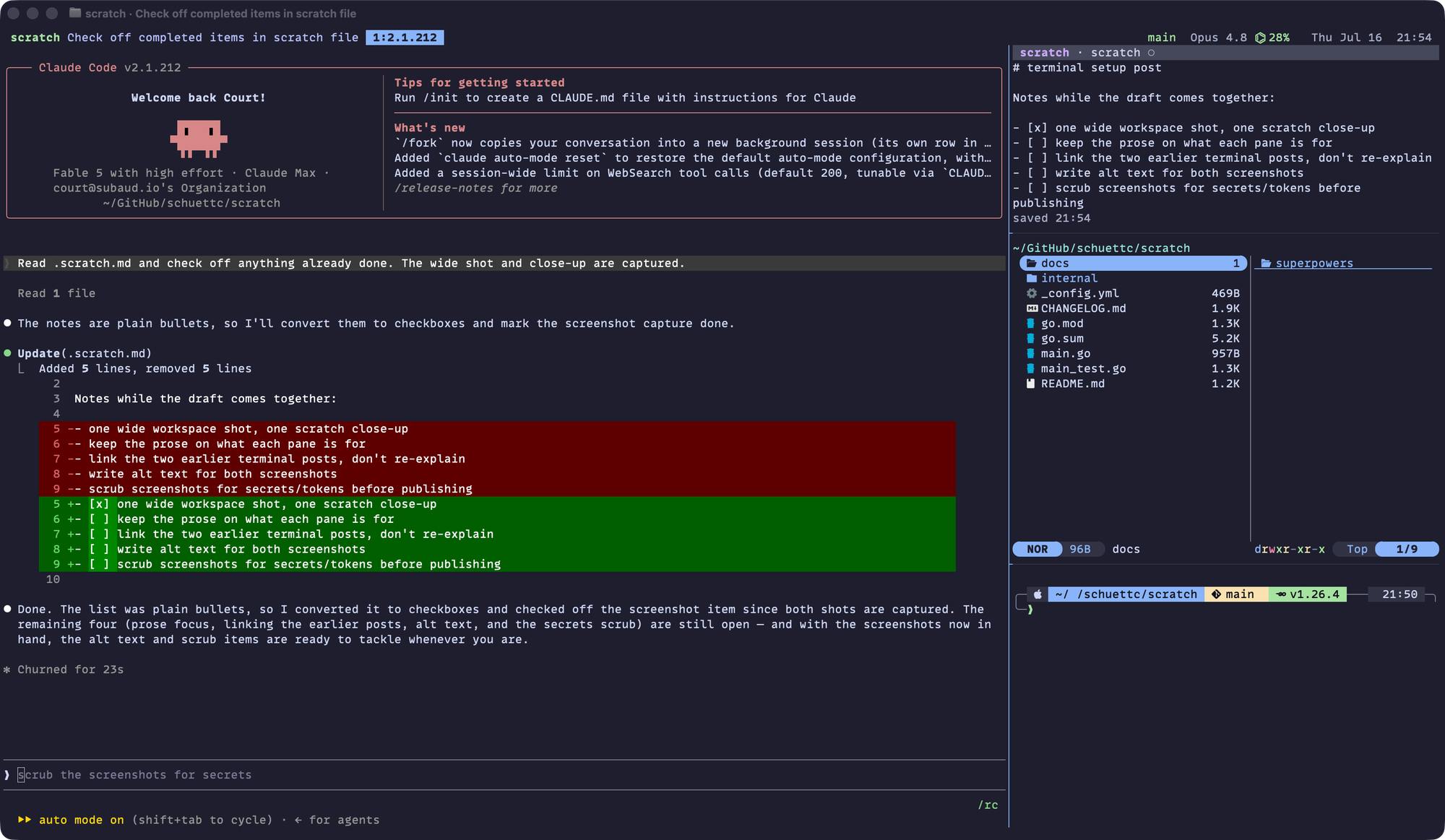
Every project session has the same shape. Claude Code runs in the main pane on the left — that's where the work happens. The right column stacks three panes: scratch, a markdown notepad, on top; yazi, a terminal file manager that opens code in neovim and markdown in MarkEdit, in the middle; and a plain shell at the bottom for one-off commands.
The frame around all of this is the model from the workspace post: a Ghostty window is a project, each tab in it is its own tmux session, and each session is one line of work — its own Claude conversation, its own branch, usually its own git worktree. proj is the way in. It's an fzf picker that first asks which project, then what to work on there — jump to a live session, open the primary clone for reading and coordinating, or pick a branch and land in that branch's worktree, created on the spot if it doesn't have one. Every project runs on its own tmux server, and a new tab (⌘T) inside a project's window automatically becomes that project's next numbered session. The picker screens, the worktree plumbing, and the cleanup commands are all in the workspace post.
The window title carries the session name and Claude's current task — in the screenshot, scratch · Check off completed items in scratch file. The label comes from Claude itself: Claude Code names its session as it works, and a statusline hook copies that name into a tmux option the titles read. prefix T sets a label by hand — a manual label wins over Claude's naming until it's cleared. Ghostty pushes all of it into the tab bar, the ⌘-Tab switcher, and the Dock, so every tab shows which project it is and what Claude is doing there. A 🔔 prefix appears when a session wants attention and clears when it gets focus.
scratch, the shared pad
I usually have several terminals open at once, each on its own project or branch, and the pad is how I keep track of what each one is doing. scratch is a small Go TUI that edits one file — .scratch.md in the current directory — mostly notes to myself: what this session is working on, what's left, where it stopped. There are no modes, and saving is automatic: atomic writes, half a second after you stop typing.
The pad is plain markdown on disk, so Claude Code reads and writes the same file I'm typing into: I jot direction there, Claude checks things off or leaves notes. The wide screenshot caught this live — the diff in Claude's pane and the updated list in the scratch pane are the same edit. Because the pane runs in the session's directory, every git worktree gets its own pad automatically, and a global gitignore entry keeps .scratch.md out of every repo.
It installs with Go:
go install github.com/schuettc/scratch@latest
Installing the dotfiles sets up the whole thing at once — the tmux config, the column scripts, and scratch itself.
When both sides edit
Two writers on one file need a collision rule, and scratch's is: never silently overwrite anyone. If the buffer is clean and the file changes on disk, scratch reloads it silently — Claude's edits appear as they land. If the buffer is dirty when the file changes, scratch keeps your keystrokes, marks the title with a filled dot, and shows a status line:
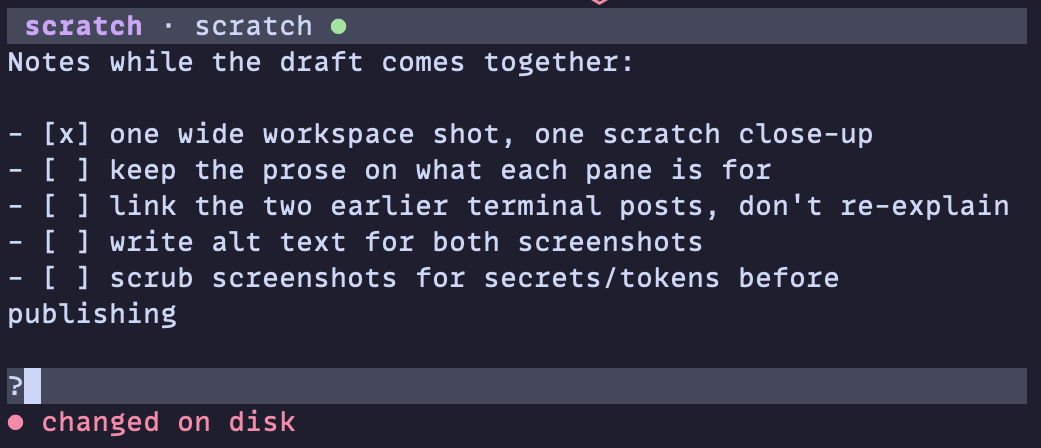
ctrl+r discards the buffer and takes the disk version.
Toggling the column
prefix f toggles the whole right column. The toggle works off a tmux tag the builder puts on each pane it creates, so it doesn't matter what's running in a pane — an agent, an editor, a shell — the column tears down and rebuilds the same way. When it opens, the column assembles visibly top to bottom: scratch and yazi each read startup responses from the terminal, and each holds focus for a beat while it does.
Editors: neovim and MarkEdit
neovim replaced VS Code as $EDITOR, running LazyVim with Catppuccin Mocha to match the rest of the terminal, and language servers for TypeScript, Python, and Go. Opening a file from yazi runs nvim inside that same pane and blocks until quit, so code editing never leaves the workspace.
Markdown is the exception. yazi's open rules send *.md to MarkEdit, a native macOS markdown editor with a live preview — Enter on a markdown file opens it, and O still offers nvim for a quick in-pane edit. The config for both lives in the dotfiles, under config/nvim/ and config/yazi/.
The settings that matter for Claude under tmux
This setup runs Claude Code in its fullscreen mode — an option in Claude Code's settings, not a default:
// ~/.claude/settings.json
{ "tui": "fullscreen" }
A full-frame TUI inside tmux inside Ghostty needs each layer configured to cooperate. The tmux side, from .tmux.conf:
set -s extended-keys on
set -as terminal-features 'xterm*:extkeys'
set -as terminal-features 'xterm-ghostty:Sync'
set -g allow-passthrough on
The first two pass modifier chords through to the inner app, so shift+tab — Plan Mode — reaches Claude. The Sync line advertises synchronized output for Ghostty: tmux buffers each of Claude's frame updates and flushes it atomically, instead of tearing frames into stale fragments during heavy streaming. allow-passthrough forwards wrapped escape sequences to Ghostty — it's what lets a shell report its working directory upward, so a new tab (⌘T) opens in the project's directory.
The Ghostty side:
keybind = ctrl+enter=text:\n
keybind = shift+enter=text:\n
bell-features = title,border,no-attention,no-system,no-audio
The keybinds give multi-line prompts a literal newline. The bell line keeps attention cues in the terminal — the 🔔 title prefix and a pane-border flash — with no Dock bounce and no sound.
Both repos are public: scratch is the notepad, and dotfiles holds the tmux, Ghostty, and zsh configuration, including the column builder and toggle scripts.