
I built much of my now-playing project with a Claude Code autopilot. I describe a feature, and it gets planned, implemented, reviewed, and shipped without me typing the intermediate steps. To do the implementation and the git work, the autopilot spawns subagents that write to the working tree.
When two lines of work touch a single checked-out git tree, there can be collisions. This post goes over the terminal setup I use to prevent them — on the autopilot's side and on mine.
The shared-tree problem
Say Feature B has an implementation in progress — uncommitted changes sitting in the working tree — and then Feature C's branch gets checked out in the same clone, on top of them. You get the usual shared-tree mess: overlaid changes, a branch already checked out error when something else tries to use B's branch, and a stretch of "what branch am I even on."
The autopilot isolates its own subagents, so two agents don't fight over one tree. The exposure is everything else that can reach the same checkout: making an edit in the primary clone, or a second Claude Code session I've opened against the repo, while parallel work is live. Nothing structural stops any of those from landing on top of in-flight work — the only thing between them and a collision is noticing in time.
So the fix is structural too: make the isolated path the default one, so a change lands in its own tree without my having to pick that path deliberately.
One worktree per line of work
The rule I settled on: the primary clone is a coordination point, not a workspace. Every distinct line of work — a feature, a fix, a one-line change, an agent's task — runs in its own git worktree on its own branch. Two lines of work never share one checked-out tree.
Git worktrees are lightweight. One repository can have many working trees linked to the same .git, each checked out on a different branch:
git worktree add .worktrees/feature-x -b feature-x dev
That creates a second working directory at .worktrees/feature-x, on a new branch feature-x based off dev, sharing the original repo's object store. You can edit, commit, and run tests in it without the primary clone ever changing branches. Branches flow feat → dev → main, so "a line of work" maps to "a feature branch" maps to "a worktree," all the way through.
The two sides that have to follow this rule are the autopilot's subagents and me. They get solved differently.
What the autopilot already isolates
The feature-workflow autopilot dispatches every subagent that writes to the tree or runs git with isolation: "worktree". There's no opt-out and no config flag to check first — the harness creates a temporary git worktree, runs the subagent inside it, and returns the worktree path when it finishes.
Not every subagent needs it. The split is by whether the subagent touches the tree:
| Subagent | Isolated? |
|---|---|
| Implementer (writes code) | Yes — own worktree |
| Fix subagent (after a review) | Yes — own worktree |
| Anything that commits / pushes / checks out | Yes — own worktree |
| Reviewer (read-only) | No — no git ops |
| Research / exploration (read-only) | No — reads files only |
The cost is one or two seconds for git worktree add per subagent, plus whatever per-worktree setup the project needs (a virtualenv, node_modules). When that setup is slow the answer is to fix it at the project level — a shared uv venv, a pnpm content-addressable store — not to turn off isolation. No setup is slow enough to be worth a collision.
This covers the subagents the autopilot dispatches, and nothing else. It does not cover me making a change in the main session, and it does not cover a second Claude Code session I open against the same repo. Those two are exactly the gap a shared tree leaves open, and they're what the terminal setup is for.
The workspace model
I used to run cmux, a GUI that managed terminals per project, which gave me a mental model I liked: a workspace is a project, and a workspace holds one or more terminals, each typically running its own conversation. I rebuilt it on tmux and Ghostty instead of looking for another GUI.
The mapping is direct:
Ghostty window  =  workspace  =  a project directory
     ├── Tab 1   tmux session "now-playing"     (shell + yazi)
     ├── Tab 2   tmux session "now-playing-2"   (its own claude)
     └── Tab 3   tmux session "now-playing-3"   (its own claude)
Each Ghostty window is rooted at one project. Each tab in that window is its own tmux session, named after the project, and each session is one line of work with its own Claude conversation, its own scroll buffer, its own branch. The file explorer (yazi) lives in the main tab's right pane.
A tab is not just a terminal — it's a line of work, which means it's a branch, which means it's a worktree. The launcher is what ties those together.
proj, in two screens
proj is an fzf picker with two steps and no flags to remember.
The first screen lists every project and any live tmux session; you pick one, or type to filter:
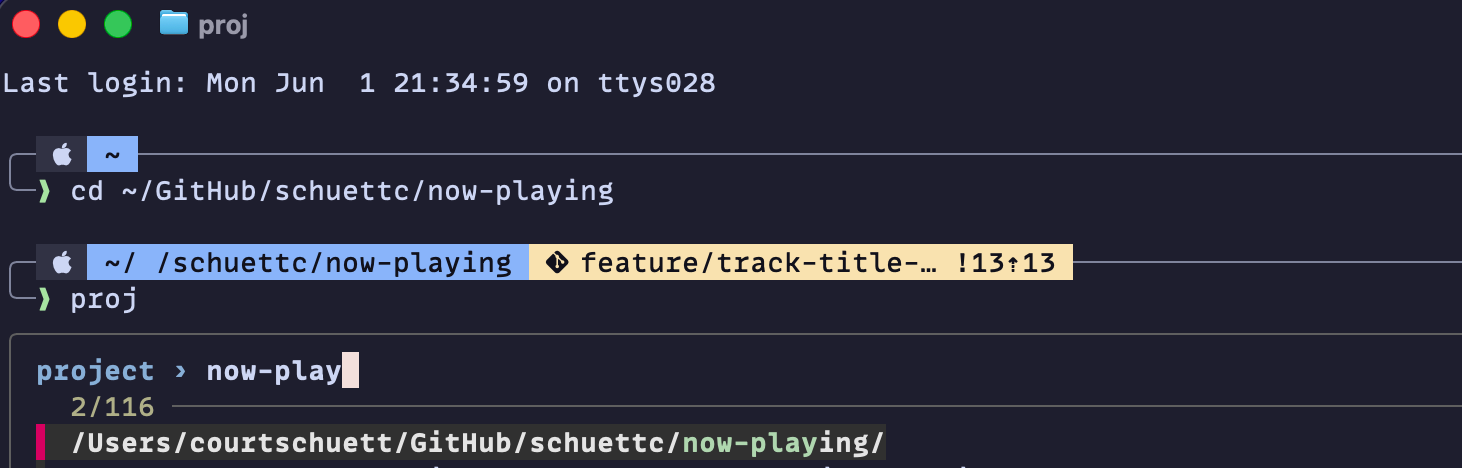
If the choice isn't a git repo, you get a plain session and none of the worktree machinery runs. If it is a git repo, the second screen lists what you can work on — and the row you pick decides the isolation:
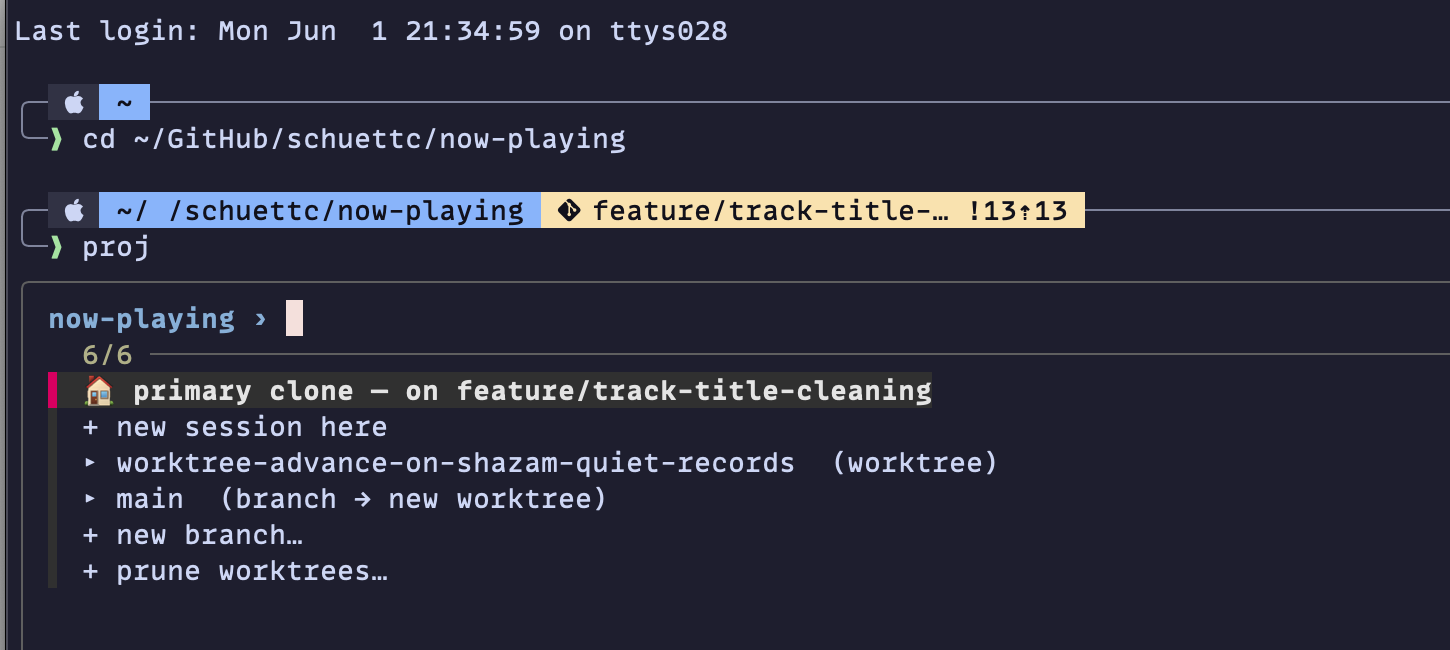
Each row maps to a kind of isolation:
🏠home base — a session in the primary clone, on whatever branch it currently has checked out (herefeature/track-title-cleaning). For reading and coordinating, not editing.+ new session here— another session in that same clone.▸a branch — opens that branch's worktree, creating one under.worktrees/<branch>if it doesn't have one yet.+ new branch…— prompts for a name, creates the branch offdev, and opens its worktree in one step.+ prune worktrees…— the cleanup path.
You think in branches and pick a row; proj runs every git worktree command underneath.
Under each branch row, one helper creates or reuses the worktree. If a branch already has a worktree, it jumps to it instead of erroring out:
# Branch already checked out in a worktree? Reuse it — this turns
# git's "branch already checked out" error into a jump.
wt=$(git -C "$primary" worktree list --porcelain |
     awk -v b="refs/heads/$branch" '
       /^worktree /{ w = substr($0, 10) }
       /^branch /  { if ($2 == b) print w }')
[[ -n "$wt" ]] && { print -r -- "$wt"; return 0; }
Otherwise it creates the worktree under .worktrees/<branch>, bases a new branch on dev, and copies in any gitignored files the project needs. The full __proj_ensure_worktree is in the dotfiles. Either way, the session opens with the standard layout wherever it lands.
The worktree plumbing proj handles
Worktrees live at <repo>/.worktrees/<branch>, and that path is ignored through .git/info/exclude rather than the repo's tracked .gitignore. The distinction is deliberate: my personal layout shouldn't dirty a .gitignore that belongs to the project, especially on repos I don't own.
A fresh worktree starts without any gitignored files — no .env, no local settings, none of the things a project needs to actually run. To handle that, proj reads an optional .worktreeinclude at the repo root (gitignore syntax): you list the gitignored paths a fresh checkout needs, and __proj_copy_includes copies each match into the new worktree as it's created. A typical entry is a .env or a local settings file — whatever the project needs on disk but git ignores — so the line of work runs immediately instead of failing on a missing config.
Cleanup is the + prune worktrees… action — an fzf --multi list of the repo's worktrees. It never force-removes; a worktree with uncommitted work is kept and reported with the --force command to run if you mean it:
kept …/now-playing/.worktrees/feature-x (uncommitted/untracked)
     — force: git -C "…" worktree remove --force "…"
Knowing when you're on the shared tree
Worktrees are a soft boundary. Nothing physically stops me from cd-ing into the primary clone and editing a file there while an autopilot runs in a worktree two directories over. So the setup makes the shared tree visible instead of trying to prevent it.
The tmux status bar runs tmux-git-status.sh for the focused pane. It prints the branch and a dirty-file count, and it adds a ⚠ primary marker when the pane is in the primary clone and linked worktrees exist:
wt_flag=""
case "$(git rev-parse --git-dir 2>/dev/null)" in
  */worktrees/*) : ;;     # linked worktree — never flag
  ?*)                     # primary clone
    wt_count=$(git worktree list --porcelain |
               grep -c '^worktree ')
    [ "${wt_count:-0}" -gt 1 ] &&
      wt_flag=' #[fg=#1e1e2e,bg=#fab387,bold] ⚠ primary #[default]'
    ;;
esac
The check it relies on is that a linked worktree's git-dir path contains /worktrees/ and the primary clone's does not — which also dodges the macOS /var ↔ /private/var symlink mismatch you hit if you compare absolute paths instead. When ⚠ primary is showing and there's live parallel work, that's the cue to open a branch in a worktree rather than type into the tree I'm looking at.
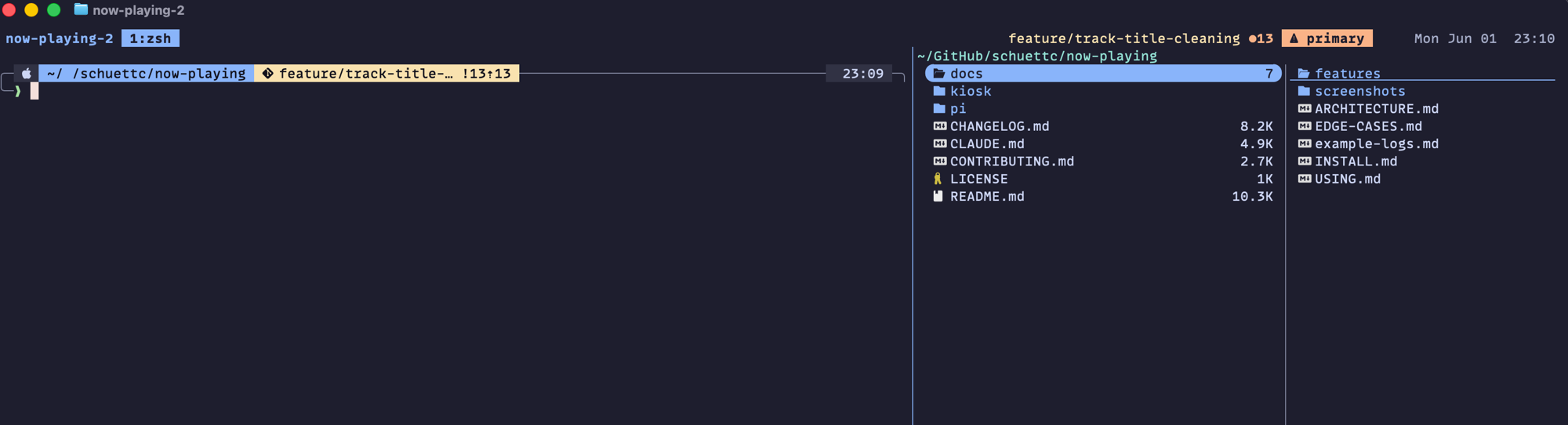
Adding terminals to a workspace
A new Ghostty window (⌘N) opens at $HOME, outside any project — so the way into a workspace is always proj. A new tab (⌘T) inside a project's window behaves differently: it inherits that project's directory, and a zsh hook (06-tmux-autojoin.zsh) turns it into the project's next tmux session automatically:
# Find the next free <project>-N slot starting at 2. tmux new-session
# -d fails atomically if the name is taken, so the loop is race-safe.
local n=2 target
while true; do
  target="${proj_name}-${n}"
  tmux new-session -d -s "$target" -c "$proj_dir" 2>/dev/null && break
  n=$((n + 1))
  (( n > 50 )) && return 0
done
# ...
exec tmux attach -t "$target"
The hook only fires inside a project whose main session already exists — spawning a brand-new workspace is proj's job, not a stray shell's. It finds the next free <project>-N, creates that session, adds the yazi pane, and execs into tmux attach. The exec matters: because the shell is replaced by the tmux client rather than wrapping it, pressing prefix → d to detach closes the Ghostty tab cleanly instead of dropping back to a stranded shell.
For this to work, the new tab has to know the project directory. The inner shell reports its cwd to Ghostty over OSC 7, and tmux only forwards that to the outer terminal with allow-passthrough on set in .tmux.conf. Without it, ⌘T inherits whatever cwd existed before the previous tmux attach, the hook doesn't recognize a project, and you get a plain shell.
When auto-join doesn't fire — usually a tab that landed at $HOME — pt is the manual version. From inside the project it auto-detects the name; from elsewhere, pt now-playing is explicit.
That leaves three commands to remember:
| Command | What it does | When |
|---|---|---|
| proj | Pick a project, then a branch or worktree — or jump to a live session | Entering or creating a workspace |
| pt | Add the next numbered session (project-2, -3, …) in the current project | A new tab where auto-join didn't fire |
| proj-clean | Kill idle shell/yazi sessions — never Claude, editors, or servers | Detached sessions have piled up |
The full key-by-key cheat-sheet lives in the dotfiles' terminal-usage.md.
Persistence and cleanup
tmux-resurrect and tmux-continuum keep the sessions alive across restarts: they auto-save every 15 minutes and auto-restore when the tmux server starts, so after a reboot tmux attach brings back the session names, the pane layouts, the working directories, and the commands that were running in each pane. It can't bring back the live state inside a long-running TUI, though — claude relaunches, but into a fresh conversation that I resume from inside Claude.
Closing a Ghostty tab only detaches its session; the session keeps running. That's why reattach and post-reboot restore work — and also why detached -2 and -3 sessions pile up. proj-clean reaps the idle ones — any session whose panes are just a shell or yazi — and never touches a session running Claude, an editor, or a server, and never the one currently attached.
The autopilot isolates its subagents because the harness gives every writing subagent its own worktree. I isolate myself because proj makes picking a branch the same thing as landing in its worktree, and the status bar flags the one place I'm not supposed to type. It's the same rule for the autopilot and for me — every line of work in its own tree.
The dotfiles are at github.com/schuettc/dotfiles (proj and the auto-join hook are in config/zsh/, the status helper in bin/). The worktree-isolation and feature-workflow plugins are at github.com/schuettc/claude-code-plugins.