
Most of the tools I use every day are ones I wrote because I was annoyed. That wasn't a plan so much as a response to specific pieces of friction I got tired of routing around, like a new laptop that took the better part of a day to feel like mine, or two agent sessions running in separate terminals with no way to tell each other anything, or a draft I wanted to edit by hand while the model rewrote the parts I had marked. Each of those annoyances turned into a small program, and over time the small programs grew into a single way of working.
This is the whole setup, starting from a laptop with nothing on it and ending with a working AI harness. Most of it consists of tools I run in the open under a single family, including kempt, proj, muster, galley, hail, and a shelf of small extensions for the harness, because the fastest way to fix my own friction kept turning out to be writing the tool that was missing.
I don't think this is the only, definitive way to work, since it is shaped by how I think and work and my experience with it. Sometimes I build something and throw it away later; other times it proves invaluable to me. The individual tools can be adopted as needed - they are open and free to use for individuals, and any of them is a reasonable place to start. The one thing I would most want someone to take from this is the habit of noticing your own friction and building it away, and these tools are a good starting point for doing exactly that.
The place to start is the same place all of it starts, with a machine that has nothing on it yet.
The machine
Previously my machine setup was a dotfiles repo with an install script and a long list of brew install commands. Because it was a sequence of steps rather than a description, the only way to know the real state of a machine was to run the script and see what happened, and the machine I was using rarely matched the one I thought I had configured.
So I wrote kempt, declarative machine setup you read before you run. One manifest describes the software and files a machine should have, and kempt shows you exactly what it would change before it changes anything.
Setting up a fresh machine is two commands:
curl -fsSL https://kempt.tools/install.sh | sh
kempt init https://github.com/you/dotfiles.git
The you/dotfiles above is a placeholder. My own config repo is public, so this stands a machine up exactly like mine:
kempt init https://github.com/schuettc/dotfiles.git
kempt init fetches the config repo, walks a picker to choose a profile, either developer for everything or minimal for just the shell, then shows the full plan and applies it once I confirm. If the box has no git, init takes a tarball URL instead: the tree is fetched and extracted, and kempt update re-fetches it. Handing someone a whole config tree doesn't require anything cloneable.
The manifest is the machine
The config lives in a single kempt.toml, and my dotfiles repo is that config repo, now that the old bash package system is gone and retired for one declarative file. Each package is a named unit that installs software and lays down files:
[packages.core]
description = "Shell foundation: CLI tools, zsh, Starship prompt"

  [[packages.core.install]]
  brew.formulas = [
    "starship", "eza", "bat", "zoxide", "fzf",
    "fd", "ripgrep", "git-delta", "lazygit", "jq", "gh", "uv",
  ]
  brew.casks = ["1password-cli", "visual-studio-code"]

  [[packages.core.symlink]]
  from = ".zshrc"
  to = "~/.zshrc"
  backup = true

  [[packages.core.verify]]
  command-exists = "starship"
A package can install (brew formulas and casks, npm globals, pi extensions, downloads), symlink files into place, json-merge fragments into an existing config file, and verify that the result actually took. Packages declare what they need, so adopting one pulls in its dependencies. My real manifest runs about 27KB across a dozen packages, including core, terminal, nvim, claude, codex, muster, galley, and pi.
Read before you run
kempt plan reads the manifest, inspects the live machine, and prints exactly what a converge would do. When everything already matches, it says so line by line:
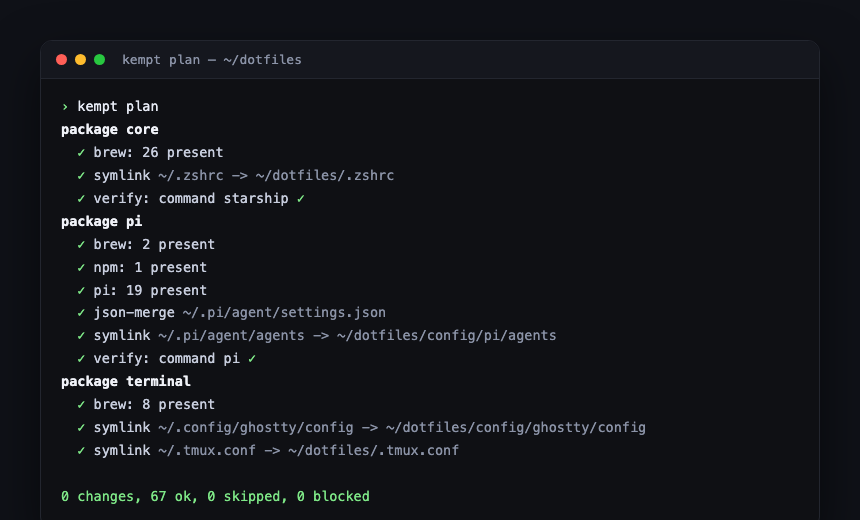
Nothing there surprises me. When something would change, whether that is a new formula, a moved symlink, or config that has drifted, it shows up as a pending change instead of a silent side effect. plan and apply never reach the network to resolve versions; only update, outdated, and upgrade do, and each says when it will.
Day to day
Once a selection is saved, the commands operate on it without repeating flags:
| Command | What it does |
|---|---|
| `kempt status` | Show the cached result of the last refresh. |
| `kempt plan` | Show what `apply` would change. |
| `kempt apply` | Converge the machine to the manifest. |
| `kempt update` | Pull the repo, self-update the binary, roll rolling entries to latest, converge. |
| `kempt outdated` / `upgrade` | List, then roll, tools that are behind. |
| `kempt adopt` / `drop` | Add or remove a package from the saved selection. |
To know what's on the machine, I read the manifest; to change it, I edit the manifest and run plan. A new laptop becomes mine in the time it takes to download the binaries, and I see the plan before any of it runs. The manifest format is specified at kempt.tools.
Folders and repos
Everything I work on lives under a couple of org directories, and within them the related repositories sit side by side rather than nested, so a producer library and the service that consumes it are siblings on disk. When a change spans several of those repos I open them as one multi-repo workspace, which is a coordination root holding a shared context file that names the member repos and the house rules, with the member repos as sibling directories beside it. Launching a session at that root is what lets cross-repo edits happen without the agent stopping to ask at every repository boundary. I wrote about why that layout beats a monorepo for this kind of work in operating several repos as one. On disk it looks like this:
~/code/
├── blog/               a standalone project
├── tracker/            another standalone project
└── acme-workspace/     a multi-repo workspace
    ├── CLAUDE.md       members + house rules
    ├── api/            member repo
    └── web/            member repo
The terminal
The terminal is where all of that work actually happens, and it is built on a few pieces I can script and reason about. Ghostty is the emulator, tmux is the multiplexer that holds the sessions, yazi is the file explorer, and scratch keeps a set of per-directory notes, with those last pieces arranged as panes around the shell. The mental model is one Ghostty window per project, and every tab in that window is its own tmux session named for the work it is doing. Every session opens with the same layout, a column of scratch, yazi, and the shell, so a line of work looks the same no matter which project it belongs to.
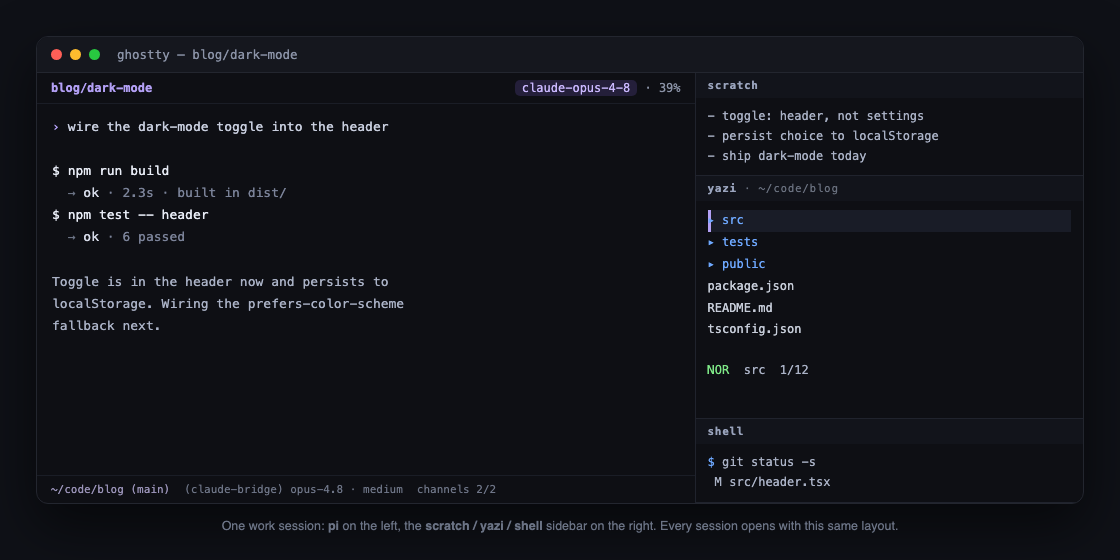
Ghostty window  =  one project
  ├── tab   session: blog            (home base)
  ├── tab   session: blog/dark-mode  (a line of work)
  └── tab   session: blog/webhook    (a line of work)
Sessions live in the project's primary clone, and when an agent needs isolation it makes its own worktree, which is the agent's to manage and not something the picker ever touches. The naming is the one convention that makes the rest work, since a session is either <project> for the home base or <project>/<work> for a named line of work, and everything downstream reads identity out of that name.
proj
proj is the way in to these sessions. Running it bare brings up a Bubble Tea picker that lists every live tmux session across every project at once, and each row carries the two things - which agent is attached to that session, whether pi, claude, cursor, or a plain shell, and a muster attention indicator that glows when the agent in that session wants a response. A preview pane on the right shows the live terminal output of whatever row is highlighted, so I can see what a session is doing before I switch to it.
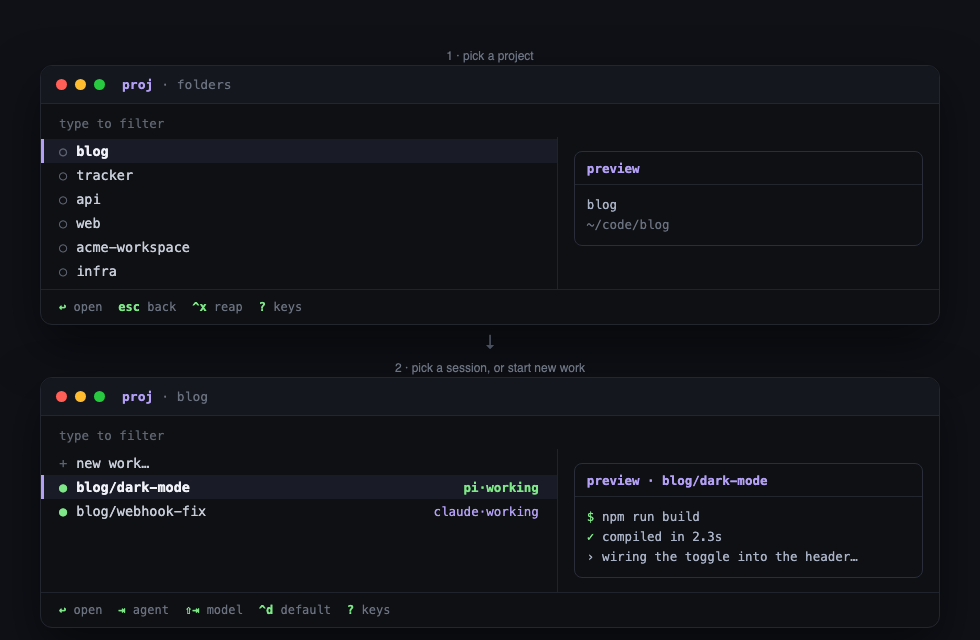
Underneath the picker, each project runs on its own tmux server rather than sharing one, so a crash or a runaway process in one project can never take down the sessions of another. That isolation is the reason I can leave long-running agents going in several projects and treat each one as genuinely independent.
Starting new work happens in the same picker. After choosing a project I name the line of work, and while naming it Tab cycles the agent and Shift-Tab opens a filterable list of that agent's models, so I choose both the agent and the exact model before the session exists. The default when I do nothing is pi on Opus 4.8, and ^d pins whatever model is highlighted as the global default so the picker opens on it next time. A project that always wants something different carries its own pin.
Most of that behavior lives in one small file, ~/.config/proj/config.toml:
default_agent = "pi"
default_model = "claude-bridge/claude-opus-4-8"
sidebar       = true

[sidebar_layout]
panes = ["scratch", "yazi", "shell"]

[project."tracker"]
default_agent = "claude"
default_model = "claude-sonnet-4-6"
The last block is a per-project override, so a project that should open in Claude on Sonnet does exactly that without my having to remember. A companion roots file lists the directories proj scans for projects, one per line, which is how a single picker sees every repo I work in.
Opening a terminal inside a project is wired to run proj on its own. When I open a new tab inside one of those project directories, I land on that project's picker instead of a bare shell prompt, so I never type the command by hand.
That naming is not only for me. Because every session carries a stable identity, the coordination tools later in this post can address a specific session by name, which is how one session comes to reach another.
The harness
For a while I moved between coding agents depending on the task, running Claude Code for some work and Codex or Cursor for the rest. They were all capable, and every one of them was a closed box. I was locked into whatever each vendor had decided the agent should be and behodlen to their frequent updates.
Instead of a specific vendor harness, I settled on pi, and I now use it for everything. It is a terminal coding agent whose behavior is assembled from packages, so the parts I wanted to change stopped being things I had to live with and became things I could change. Most of the small extensions in this section are ones I wrote to close a specific gap, and they load into every session I start.
pi's own configuration is declarative too, and it lives in the same machine manifest as the rest of the setup. kempt, the declarative setup tool from the first section, writes it into ~/.pi/agent/settings.json in the same pass that installs my command-line tools and lays down my dotfiles. That file sets the default model and thinking level, turns on context compaction so long sessions do not fall off the end of the model's context window, and lists the extension packages that load, in order:
{
  "defaultProvider": "claude-bridge",
  "defaultModel": "claude-opus-4-8",
  "defaultThinkingLevel": "medium",
  "compaction": { "enabled": true },
  "packages": [
    "npm:pi-claude-bridge",
    "npm:pi-quiet",
    "npm:pi-bang",
    "npm:@hank-warren/pi-plan-mode",
    "npm:pi-memory",
    "npm:pi-schedule",
    "npm:pi-tmux-bridge",
    "npm:pi-wakeup",
    "npm:channels.tools",
    "npm:pi-provider-guard",
    "npm:@schuettc/pi-auto-review",
    "npm:@tintinweb/pi-subagents"
  ]
}
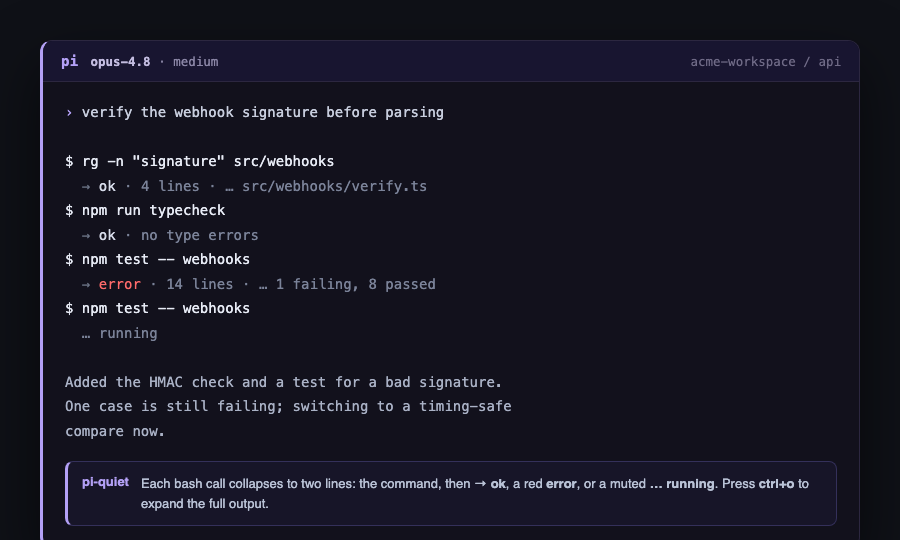
A few of those packages change how the session reads at the prompt. pi-quiet collapses each routine bash call to a single calm line and keeps the full output one keystroke away for when I actually need it, and pi-bang makes a shell command I run by hand trigger the model to react to its output, instead of the result sitting in the buffer until my next message.
Another group gives the session the memory and sense of time a long piece of work needs. pi-plan-mode adds a real planning mode that produces a decision-complete plan before any code is written, pi-memory gives the session a durable memory it can search and add to across days, and pi-schedule lets me hand the agent recurring or deferred work such as polling a build or checking something on a timer.
The next group is how a session reaches out and gets reached. channels.tools connects small local servers that push events into a live session, waking it when it is idle and queuing the events when it is mid-turn, while pi-tmux-bridge and pi-wakeup let a session be nudged and woken through tmux. These are the plumbing underneath the coordination tools in the next section, so I will come back to them there.
The last group is about staying safe and delegating work. pi-provider-guard keeps a session from silently drifting onto a metered model, pi-auto-review is a security authorizer that decides which actions are allowed to run without stopping to ask me, and pi-subagents lets a session dispatch child agents for parallel or scoped work.
Two of those child agents are ones I define myself, and they carry the same review discipline the rest of my workflow runs on. A worker reads a task brief, implements exactly what the brief says with the exact values it gives, runs the verification the brief names, commits, and writes a report of what it did; it never creates branches, never spawns further agents, and returns a question rather than guessing when the brief is ambiguous. A reviewer is strictly read-only, reads the brief along with the worker's report and the diff, and returns a verdict on both spec compliance and code quality, naming a file and line for every finding. Keeping those two roles apart matters for the same reason the review step later in this post runs on a different model than the one that wrote the code, which is that the author is the worst judge of its own work.
Models and providers
The conversation I am actually having with the agent runs on Opus 4.8 by default, and it reaches that model through a bridge rather than a raw API key. Opus 4.8 is the default, not the ceiling, so stronger models like Fable 5.1 are there when a task needs them and I select them as I go. pi-claude-bridge routes pi through Claude, so I pick the model from inside pi and the whole session, meaning everything the agent does and not just its tool calls, stays in pi's own interface. The reason it is a bridge and not a metered API connection is billing: it runs on my existing Claude subscription instead of a separate per-token bill.
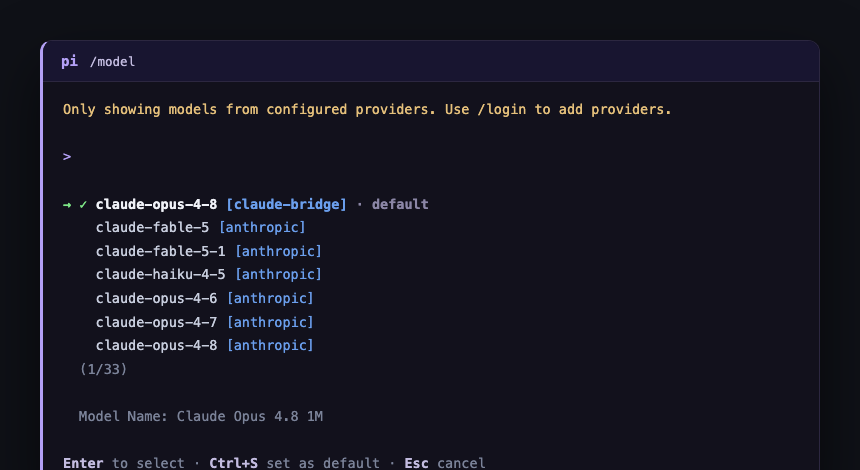
Using the best model for everything would be wasteful, though, because most of the work a session spins off is not the hard part. The main session is what hands work off, dispatching child agents through pi-subagents, and it names the model each child runs on at dispatch time rather than letting the child inherit the conversation's expensive model. The convention I dispatch by is fixed. An implementer that is following a complete brief runs on Opus, because writing the code is where judgment matters most. A reviewer checking that implementation against the brief runs on Sonnet, which is more than enough to catch a spec violation or a missing test. A mechanical, tightly scoped re-check runs on Haiku. The cost of a session follows the difficulty of the work rather than a single global setting, and the child agents reach their models over the direct API so the main conversation is never disturbed.
Because the provider is only a setting, none of this is tied to one model family. A session can run on Anthropic through the bridge or on OpenAI through its own provider, and moving between them is a single choice in the model picker rather than a different tool. That matters most for review, where the most honest check on a piece of code comes from a model that did not write it and does not share its instincts. I can point a reviewer running on OpenAI at code an Anthropic model produced, or do the reverse, so the review becomes genuinely adversarial instead of a model nodding along to its own habits.
The one thing I do not want is to drift onto a metered path without noticing, which is what pi-provider-guard prevents. It watches the provider a session is using and keeps it from silently falling through to a billed model, so the default stays on the plan-quota path unless I deliberately choose otherwise. That guard is the reason I can leave the tiering on autopilot and trust that a stray dispatch will not quietly run up a bill.
Coordination and channels
Once I had more than one agent session running at a time, a new kind of friction showed up. The sessions were blind to each other, so a session that finished a piece of work had no way to tell another it was ready, and a session sitting idle had no way to hear that something it was waiting on had happened. Nothing outside the terminal could reach a session either. A build finishing, a file changing, or me being away from the desk were all events the agent simply could not see.
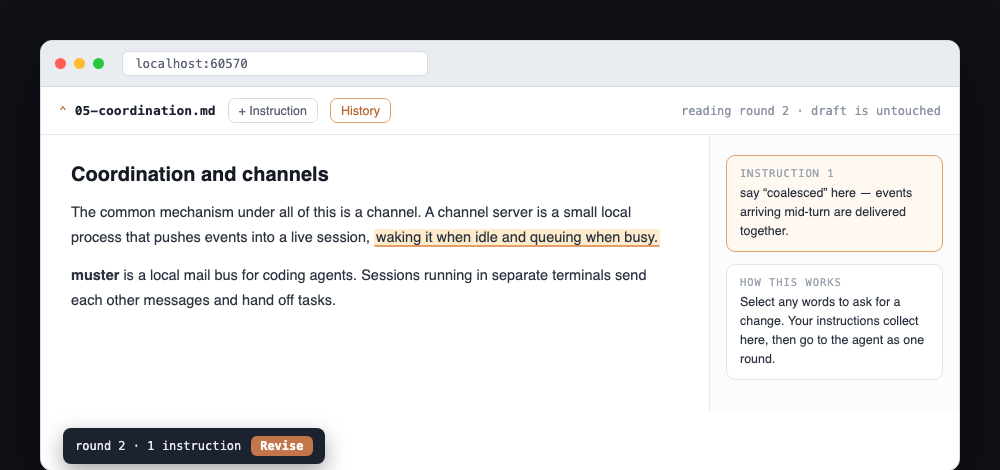
The common mechanism under all of this is a channel. channels.tools is a small pi extension that connects channel servers, which are little local processes that push events into a live session. When an event arrives and the session is idle, the session starts a turn immediately, and when the session is mid-turn the events are held and delivered together the moment the turn settles, so a running turn is never interrupted. The servers are subprocesses the session spawns from its own config, and nothing listens on a network, so the whole arrangement stays on my machine. Each server also registers its own tools, so once a server is connected the agent can act on what arrived and not merely read it. That protocol is the floor, and the tools that matter are the ones that speak it.
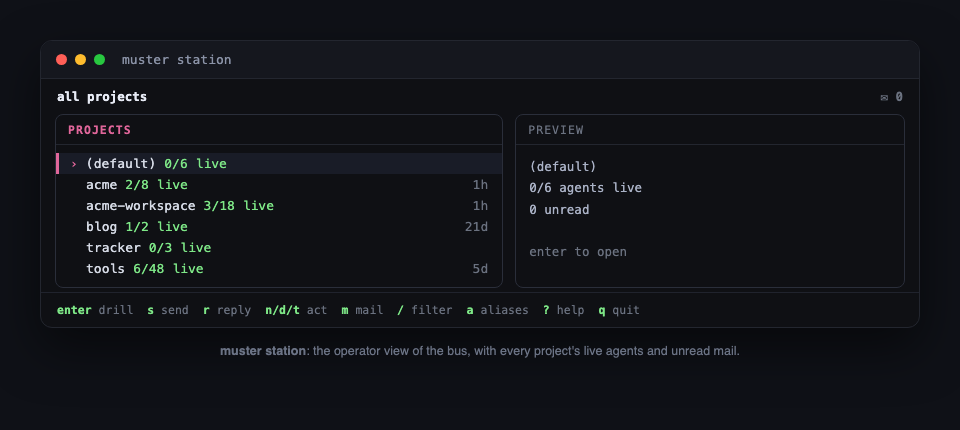
muster
muster is a local mail bus for coding agents. Sessions running in separate terminals send each other messages and hand off tasks, and because muster speaks the channel protocol those messages can wake an idle session or queue for a busy one. One session posts a task like reviewing a branch that was just pushed, a standing session in another terminal claims it, does the work, and replies. The wake is native to tmux, so unread mail sets a small mailbox marker on the recipient's tmux tab, and that same attention signal is what the picker surfaces as the glow on a session's row. Everything runs over a local socket with its state in a local file, and muster itself never calls a model, since all it does is move messages between the agents that do.
galley
galley is a review page for a document, shared between me and the agent, and it is the tool this post is being written through. I ask the agent to open a draft and it returns a URL. On that page I read the draft and edit anything I want by hand, and where the agent should do the work I highlight the passage and write the instruction, then press Revise. The agent receives those instructions, rewrites the file, and the result comes back with the changes marked, and I keep going until it is right and then press Approve. Every time either of us sends, a copy of the file is saved beside it on my machine, so any point in the review can be reopened to see exactly what changed. Nothing is uploaded, and the file stays ordinary Markdown the whole way through. galley reaches the session through the same channel protocol, so pressing Revise is simply an event delivered into the running agent.
hail (in progress not released yet)
hail is the piece that reaches a running session from my phone. Where the others let sessions reach each other and let local programs reach a session, hail extends that last reach to me when I am away from the desk, so a session that stops to ask a question can find me and I can answer without being at the machine. It is the newest of these and still coming together, built on a small protocol for identity, pairing, and sealed messages passed between the phone and the session.
Underneath all three is the same pair of ideas. Every session has a stable identity from the picker, and the channel protocol gives anything on the machine a way to push an event into it. Once those two things exist, the same session can be reached by another session, by a local program, or by me from across town, each through its own channel server.
The workflow
The shape of a piece of work is always the same: capture, plan, implement, review, then ship.
Capture comes first and never really stops. When an idea shows up it goes into a backlog as a small record with the problem stated while it is still fresh. This is also how I keep scope from running away: if I am building a feature and realize the config loader underneath it needs its own rework, that rework becomes a backlog item or a task for another session over muster instead of derailing the work I am on. The backlog grows as I learn the real size of the work and shrinks as things ship.
Planning rarely means a formal planning mode. Most of the time it runs through the brainstorming skill from the superpowers set, which first classifies the work as a quick spike, a bounded change, or something architectural, then asks one question at a time until the design is settled and, for the larger cases, writes it down as a spec the implementers execute from. Running the agent in a directed auto mode against that design is usually enough. I only reach for pi-plan-mode when the work is large or its decisions are load-bearing enough to want a plan another agent could execute without guessing. Either way the aim is to settle the decisions before any code is written rather than during it.
Implementation runs through the subagent-driven-development skill, where the session I am in becomes a coordinator that dispatches a fresh implementer subagent for each task. The brief handed to it is a file holding that task's requirements with the exact values to use verbatim, and it is the implementer's single source of truth. The implementer writes the failing test first when the brief calls for it, implements until it passes, runs the verification commands the brief names, commits, and writes a report file, returning only a short status such as DONE along with its commit hashes. The coordinator never writes the code itself, which keeps its context free for driving the work rather than doing it.
For anything larger than a single plan, that same idea scales up from subagents to whole sessions. I spin up separate role-based sessions, one owning the API and another the web client, for example, each an expert on its assigned piece, and a coordinator session directs them over muster. The coordinator hands each session its task, the sessions work and report back through the mail bus, and the coordinator tracks the whole effort in a ledger file so it survives even a session restart. I keep similar work from overlapping, since two sessions doing the same kind of task interfere, but genuinely separate pieces run at the same time.
Review is where that principle takes effect. After a task is implemented, the coordinator assembles a review package, which is the commit list and the full diff, and hands a separate reviewer three files: the same brief, the implementer's report, and that diff. The reviewer is strictly read-only and cannot slip from reviewing into fixing. It returns spec compliance as a check or a cross against each requirement in the brief, and code quality as findings graded Critical, Important, or Minor, each naming a file and line. It is usually a different model than the implementer, and often a different provider, so the check is genuinely adversarial rather than a model agreeing with its own work.
Only once that local loop is satisfied does the work become a matter of git and continuous integration, which is its own step and the subject of the next section.
Git and CI
Local review makes the code trustworthy, but the reason everything then goes through git and CI runs deeper than the obvious backups and rollbacks, real as those are. Models work unusually well with git. A branch, a worktree, a diff, a commit message, and a history to read back are exactly the kind of structured, inspectable state an agent reasons about well, so giving it git as its working surface plays to its strengths instead of against them.
That advantage compounds the moment deployment is wired into git too. When merging is what deploys, the agent never needs a credential sitting on my machine to ship anything, because the deploy runs in CI under its own identity rather than from the session. Every deployment then becomes a recorded event tied to the commit that caused it, so there is a full history of what shipped and when, and nothing depends on what happened to be typed into a local shell. Wiring this up early, even on a small project, is what makes the larger version of it easy later, because the day a real deploy matters the pipeline is already there.
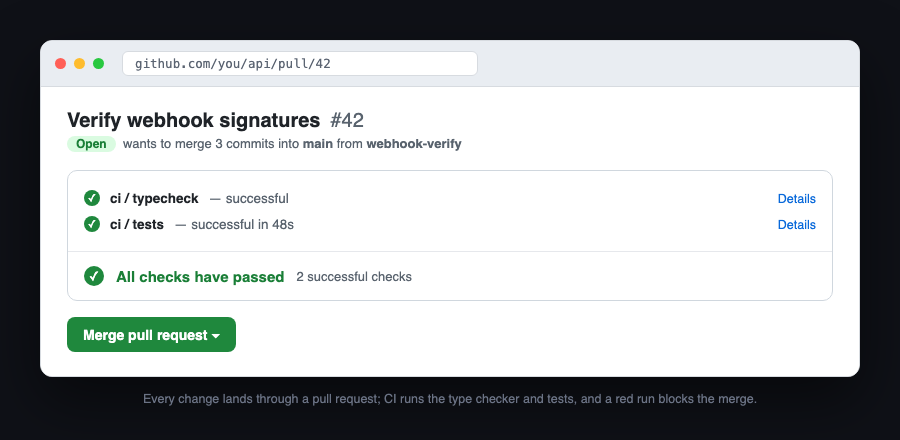
Every piece of work lands through a pull request, never a local merge into the main branch. Even when I am the only person on a repo, the pull request is the checkpoint: it is where CI runs, where the diff gets one last look, and where the record of why a change happened stays attached to the change itself. A branch that is ready opens a PR, and nothing reaches main another way.
CI validates the change before it can merge. On every pull request, GitHub Actions checks out the code, installs it, and runs the type checker and the tests, and a red run blocks the merge. The workflow is small and says exactly that:
on:
  push:
    branches: [main]
  pull_request:
jobs:
  check:
    runs-on: ubuntu-latest
    steps:
      - run: npm ci
      - run: npm run typecheck
      - run: npm test
Merging is what triggers a deploy, and the deploy never sees a stored key. The workflow authenticates to AWS with OIDC, exchanging its short-lived GitHub identity for a role at run time, so there are no access keys sitting in a secret store to leak. Each property assumes its own role and writes only its own bucket, and the pipeline deploys only the things that actually changed, so a bad change to one site cannot reach another.
The infrastructure a deploy runs against is itself code, defined once and reused across projects rather than clicked together by hand in each one. Keeping it standard means every project deploys the same way and behaves the same way, and changing how deployment works happens in one place instead of being repeated project by project.
Publishing a release works the same way. A release is a tagged point in the git history that a workflow turns into a published artifact, built in CI and made available for anyone to install. It runs without any token or key on my machine, and it records exactly what was published and from which commit.
None of this is elaborate, and that is the point. The interesting judgment happened earlier, in the design and the local review, so by the time a change reaches git the job left is to validate it and ship it without drama, and CI does exactly that and nothing more.
Links
The harness
- pi: the coding agent everything runs on.
The tools (self-hostable, source-available)
- kempt: declarative machine setup. Source.
- tackle: the workshop terminal tools, including proj, scratch, and creel. Source.
- muster: the multi-agent coordination bus. Source.
- galley: document review shared with the agent. Source.
- channels: push events into a live pi session.
- hail: reach a running session from your phone.
pi extensions
- pi-extensions: pi-quiet, pi-bang, channels.tools, pi-provider-guard, pi-tmux-bridge, and pi-wakeup.
- pi-claude-bridge: run Claude models inside pi.
Config and shared code
- dotfiles: my machine, as a kempt config.
- tools-common: the shared CLI foundation for the family.
The family
- subaud.tools: every .tools property in one place.
 Court Schuett
 Court Schuett