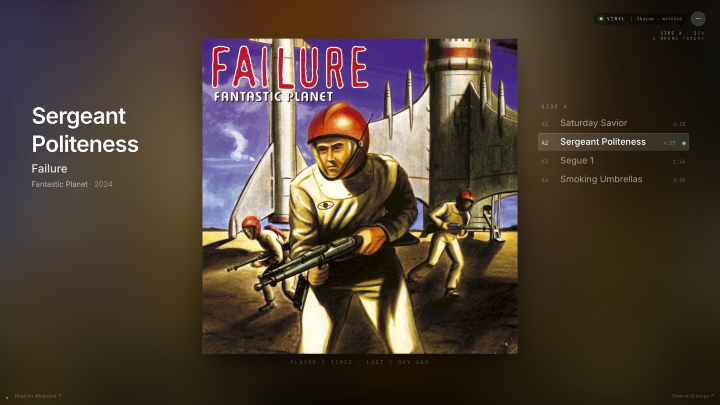
I have a turntable wired into a Sonos zone, and for a long time the only way to know what was playing was to go through the arduous process of reading the sleeve I'd left next to it. If I wanted to know what tracks were on it, I'd have to flip it over. These laborious processes were too difficult for me. I wanted what a streaming app gives you — the track, the artist, the album art on a screen — but for vinyl. Now Playing is what I built to get there: a Raspberry Pi "listens" to the turntable's audio and renders the current track, artist, album art, and a side timer on a wall-mounted display, in real time.
The hard part is that vinyl carries no metadata. A streaming service knows the track because it's the one serving it; a turntable just sends an analog signal down a wire. So the Pi has to listen to the audio and work out what's playing the way you would with Shazam on your phone — except continuously, hands-free, and accurately enough to keep a wall display in sync with the record as it plays.
What you see
The display shows whatever is on the turntable right now, with high-resolution album art behind it and the current side's tracklist down one edge. Drop a needle on a new track and the screen catches up within about fifteen seconds. Lift the needle and it falls back to a clock after about fifty. Most of the time it runs hands-free — you put a record on and the wall keeps up with it.
When Shazam can't identify a track, you can identify it yourself with a tap. If the album is already locked — because an earlier track matched, or you picked it by hand — the kiosk instead shows a BEST GUESS card with the track it expects, and asks you to confirm. And if it gets something wrong — the wrong pressing, or the wrong track on the right album — a "Something wrong?" menu lets you fix it from your collection in a tap or two. After you've played a record a few times it stops needing to ask. The system gets more accurate the more you use it, which is a thread that runs through most of how it's built.
How it works
Sonos plays the record aloud, and a parallel copy of the line-in signal goes to a USB audio interface on the Pi. Every fifteen seconds, as long as there's signal above the silence floor, the Pi sends a twelve-second clip to Shazam. The track Shazam returns gets matched against your Discogs collection first, so you see your specific pressing's tracklist and cover. If you don't own the record — a friend's loan, a recent purchase, something you never synced — the orchestrator falls back to a MusicBrainz lookup that fills in the same album context and saves it for next time. When Shazam misses on a track but the album is already locked, the orchestrator advances through the tracklist and shows the predicted track instead of dropping to "couldn't identify." The final answer goes to the display over a WebSocket.
flowchart TD
    Turntable[Turntable] --> Preamp[RIAA preamp]
    Preamp --> Sonos[Sonos line-in]
    Preamp --> UFO202[UFO202 USB]
    Sonos --> Speakers[Speakers]
    UFO202 --> Pi[Raspberry Pi]
    Pi --> Capture[Capture · 15s heartbeat]
    Capture --> Shazam[ShazamIO · 12s clip]
    Shazam --> Discogs[Discogs catalog]
    Shazam --> MB[MusicBrainz lookup]
    Discogs --> Advance[Tracklist-aware advancement]
    MB --> Advance
    Advance --> WS[WebSocket → kiosk display]
What makes it interesting
A few parts of this turned out to be harder and more interesting than the basic "send a clip to Shazam" loop suggests, and they're what I want to write about in more detail.
The kiosk gets better at your collection the more you play it. Shazam handles recognition on every pass, but it reliably misses some tracks — short interludes, segues, deep cuts. A local fingerprint fallback, trained on the plays you've already confirmed, gradually learns those tracks and catches them on later plays without waiting on a cloud call. It also handles records that aren't in your Discogs collection by discovering them through MusicBrainz on first play, so an off-Discogs record behaves like a synced one by the third time you put it on. And because the whole thing depends on real audio through a real capture device with real timing, a lot of its behavior only shows up on the actual hardware — which makes it a different kind of thing to debug than normal software.
Beyond the turntable
The kiosk isn't vinyl-only. The Sonos zone tells it what the current source is — AirPlay, a streaming service, radio, even the TV — and it handles each. When Sonos already knows the track, like Apple Music or Spotify, the kiosk renders that metadata directly and skips recognition. When audio arrives without it — an iPhone sent to Sonos over AirPlay — it runs the same line-in-and-Shazam path as vinyl, so you still see what's playing.
A few smaller pieces fill it out. Confirmed plays scrobble to Last.fm if you've set up a key. An optional LLM assist — Anthropic's Haiku — sits at a few cascade decision points, like judging whether a Shazam hit that disagrees with the locked album is a real track change or just a sampled source; without a key it falls back to plain rules. And the repo ships a Claude Code skills bundle, so you can ask it to set the kiosk up, tell you what it's doing right now, or troubleshoot the service in plain language instead of digging through logs.
Source
The source is at github.com/schuettc/now-playing.
 Court Schuett
 Court Schuett